














جديد

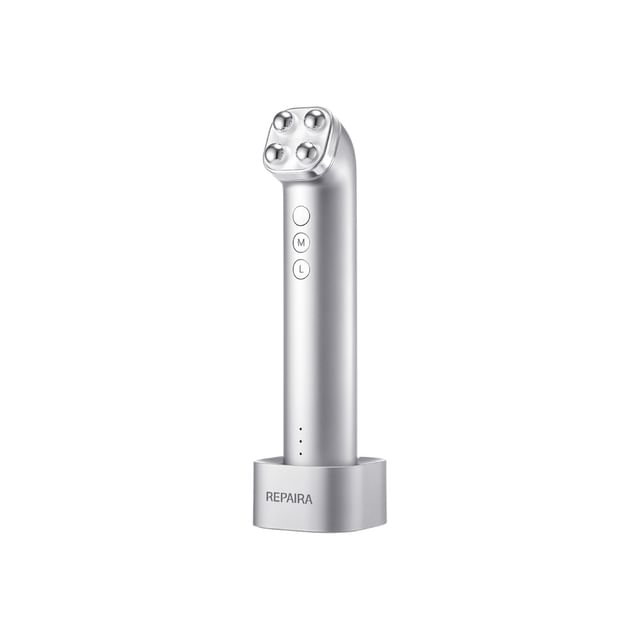
Cell Fusion C - Repaira Quad-X
1,013.44 SAR
1,266.80 SAR20% خصم
الشحن إلى المملكة العربية السعودية
- شحن قياسي مجاني مع أي عملية شراء بقيمة 215 SAR. (7 - 14 يوم عمل)
- الإسترجاع والتبديل
الميزات
Size: 50 x 185 x 34mm
Repaira Quad-X 1 pc
Cradle 1 pc
Charging Cable 1 pc
User Manual (Korean, English) 1 pc
Benefits:
A dual skincare device that features RF and EMS technologies to help enhance skin elasticity and volume by delivering energy deep into the skin and stimulating facial muscles with electrical impulses.
Its washable, detachable head allows you to rinse it with water, ensuring hygienic maintenance.
Features 3 multi-use modes—Deep Therma Mode, Mid Lift Mode, and Dual Layer Mode—for collagen boosting, facial contouring, and lifting care.
You can adjust the intensity from levels 1 to 5 according to your skin sensitivity and condition.
Guide for each mode:
Dual Layer Mode: A signature mode featuring a red LED light that simultaneously targets both the skin and muscle layers.
Deep Therma Mode: A high-frequency thermal massage mode featuring a yellow LED light that delivers deep heat.
Mid-Lift Mode: An intensive facial muscle treatment mode featuring a green LED light that uses Dual-EMS while minimizing skin irritation.
How to use:
1. Press and hold the Power button for 2 seconds to turn on the device.
2. Press the Mode button (M) to select desired mode.
3. Press the Level button (L) to select desired level. The default setting is level 1, and up to 5 levels can be set. The level increases by one each time the button is pressed.
4. Pressing the power button during operation will pause the device with voice guidance. Pressing the power button again while paused will resume operation. If the device remains paused for 5 minutes, it will automatically turn off.
5. Before using the product, gently pat dry any remaining moisture after cleansing, then evenly apply the designated gel all over the face before use.
6. For Dual Layer Mode, with the head gently pressed against the skin, move upward from the corners of the mouth along the cheek bones. When the vibration signal occurs, slowly move the device in a lifting motion, then move to the next area when the vibration stops.
7. For Deep Therma Mode, with the head gently pressed against the skin, slowly roll the device from the center of the face outward. As this mode has no vibration signal, keep rolling continuously without staying in one area for too long.
8. For Mid-Lift Mode, pause briefly and press the head firmly against areas of concern for mid-face sagging. When the vibration occurs, take time to fully feel the stimulation from the device, then move to the next area when the vibration stops.
9. Once the full operation time has elapsed, the device will automatically turn off with a voice announcement. To manually turn off the device during use, press and hold the power button for two seconds.
10. After treatment, remove any remaining gel with a tissue or toner pad, then gently pat the skin until fully absorbed.
11. Remove the head by gently lifting it with your thumb. Rinse with water, wipe clean with a soft cloth, and attach it to either magnetic side of the cradle to dry.
Manufacturer’s Warranty Period and Details:
This product (Cell Fusion C – Repaira Quad-X) is covered by a manufacturer’s warranty that expires 12 months from its shipment date.
During the warranty period, customers will be entitled to free repair service if the defective item is caused by non-human factors and within scope of warranty.
Repair for defective item will be charged after the warranty period.
Within Scope of Warranty: Limited to malfunctions occurred during normal use.
Out of Scope of Warranty: For malfunction or damage resulting from human factors listed below:
Any improper use and damage caused by accident or improper storage of the device (e.g. device dropped), any usage of the product not in the way as described in the user’s manual;
Alteration of the appearance or replacement of the product parts or dismantlement of the device on your own resulting in the device failing to function normally;
Any usage of the product not in the way as described in the user’s manual;
Repair by an unauthorized manufacturer or third party.
Battery: DC3.6V / 3500mAh rechargeable
This Repaira Quad-X comes with:
Dual Layer Mode: A signature mode featuring a red LED light that simultaneously targets both the skin and muscle layers.
Deep Therma Mode: A high-frequency thermal massage mode featuring a yellow LED light that delivers deep heat.
Mid-Lift Mode: An intensive facial muscle treatment mode featuring a green LED light that uses Dual-EMS while minimizing skin irritation.
How to use:
1. Press and hold the Power button for 2 seconds to turn on the device.
2. Press the Mode button (M) to select desired mode.
3. Press the Level button (L) to select desired level. The default setting is level 1, and up to 5 levels can be set. The level increases by one each time the button is pressed.
4. Pressing the power button during operation will pause the device with voice guidance. Pressing the power button again while paused will resume operation. If the device remains paused for 5 minutes, it will automatically turn off.
5. Before using the product, gently pat dry any remaining moisture after cleansing, then evenly apply the designated gel all over the face before use.
6. For Dual Layer Mode, with the head gently pressed against the skin, move upward from the corners of the mouth along the cheek bones. When the vibration signal occurs, slowly move the device in a lifting motion, then move to the next area when the vibration stops.
7. For Deep Therma Mode, with the head gently pressed against the skin, slowly roll the device from the center of the face outward. As this mode has no vibration signal, keep rolling continuously without staying in one area for too long.
8. For Mid-Lift Mode, pause briefly and press the head firmly against areas of concern for mid-face sagging. When the vibration occurs, take time to fully feel the stimulation from the device, then move to the next area when the vibration stops.
9. Once the full operation time has elapsed, the device will automatically turn off with a voice announcement. To manually turn off the device during use, press and hold the power button for two seconds.
10. After treatment, remove any remaining gel with a tissue or toner pad, then gently pat the skin until fully absorbed.
11. Remove the head by gently lifting it with your thumb. Rinse with water, wipe clean with a soft cloth, and attach it to either magnetic side of the cradle to dry.
Manufacturer’s Warranty Period and Details:
This product (Cell Fusion C – Repaira Quad-X) is covered by a manufacturer’s warranty that expires 12 months from its shipment date.
During the warranty period, customers will be entitled to free repair service if the defective item is caused by non-human factors and within scope of warranty.
Repair for defective item will be charged after the warranty period.
Within Scope of Warranty: Limited to malfunctions occurred during normal use.
Out of Scope of Warranty: For malfunction or damage resulting from human factors listed below:
تفاصيل
معلومات المنتج
| مستورد من: | كوريا الجنوبية |
| اللون: | 1 Set |
| رقم الكتالوج: | 1138048124 |
معلومات أخرى
مرجع الترجمة لعبوات منتجات التجميل الكورية:
حول العلامة التجارية: Cell Fusion C
YesStyle هو بائع تجزئة معتمد لشركة Cell Fusion C.
العلامات ذات الصلة
استرداد الرسوم الجمركية ملاحظات التسوق